
Menu & automation
A better pot on a campfire opens its own menu. It has the same slots as Cobblemon's pot, plus a few buttons around the edges for automation.
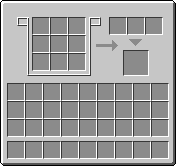
- Left: 3×3 input grid. Ingredients go in any slot, in any arrangement.
- Top right: seasoning slots. Only accept items the current recipe can be seasoned with.
- Bottom right: output slot.
- Lid button under the arrow opens and closes the lid. The pot only cooks with the lid closed.
Buttons outside the menu:
| Button | Where | What it does |
|---|---|---|
| Lock | Left side, top | Locks or unlocks the slots to the saved layout |
| S | Left side, below the lock | Saves the current item layout |
| Config | Right side | Opens the side config panel |
Pattern-free cooking
A better pot does not care where ingredients are in the grid. Any arrangement of the right items, including everything stacked in one slot, matches the recipe. A hopper or pipe can simply push ingredients in.
The pot pauses while its output slot holds a different dish or is full, so keep the output side emptied.
Side config
Each face of the pot exposes one group of slots to hoppers, pipes and other item transport. Sides are relative to the way the pot is facing, so the same setup works however you place it.
Open the config panel from the button on the right of the menu, then click a side to cycle it between Input, Seasoning and Output. Hover a side to highlight the slots it points to. Try it here:
- Top→ Seasoning
- Left→ Input
- Front→ Input
- Right→ Input
- Back→ Input
- Bottom→ Output
Click a side to cycle it, like in game.
- Input
- The 3×3 ingredient grid
- Seasoning
- The three seasoning slots
- Output
- The finished dish, extract only
The defaults are:
| Side | Slots |
|---|---|
| Top | Seasoning |
| Front, back, left, right | Input |
| Bottom | Output |
Locking slots
Autocrafters push items into whichever slot is free, which can fill the grid with the wrong things. Locking stops that:
- Put one of each item where you want it: ingredients in the grid, seasoning in the seasoning slots.
- Press S to save that layout.
- Press the lock button.
While locked, each slot only accepts the item saved for it, and empty saved slots show a faded preview of their item. A locked pot also waits until every saved slot is filled before it starts cooking, so it never cooks a half-loaded recipe.
Seasoning
To automate recipes with seasoning, give seasoning its own side (the top, by default) instead of pushing everything into the input side. Seasoning slots only take items the current recipe can use, so the ingredients need to be in first.
Auto output
With autoOutput turned on in the common config, a pot pushes finished dishes into the container on its item-facing side, the same side leftover items go to. It is off by default. Without it, pull dishes from the output side with a hopper or pipe.